The Lists data structure in Python is similar to dynamic arrays in C++ or Java. A list can contain elements of any data type such as integer, float, String, etc. To be more precise, a list can include any type of object. In Python, we can easily add or remove elements in a list.
1. Creating a List data structure in Python
A List data structure in Python is created by using the square bracket []. Example:
# Creating a blank List
List = []
print("Blank List: ")
print(List)
# Creating a List of numbers
List = [10, 20, 14]
print("List of numbers: ")
print(List)
# Creating a List of strings
List = ["John", "Marry", "Kane"]
print(List)
# Creating a Multi-Dimensional List
# (By Nesting a list inside a List)
List = [['John', 'Marry'], ['Kane']]
print("Multi-Dimensional List: ")
print(List)
# Creating a List with mixed data types
List = [1, "Hello", 3.4]
print("List with mixed data types: ")
print(List)
Output
Blank List:
[]
List of numbers:
[10, 20, 14]
['John', 'Marry', 'Kane']
Multi-Dimensional List:
[['John', 'Marry'], ['Kane']]
List with mixed data types:
[1, 'Hello', 3.4]
The Lists in Python can contain duplicate elements
List = [1, 1, 4, 4, 3, 3, 3, 6, 5]
print("List with the use of Numbers: ")
print(List)

List = [1, 2, 'Gochocit', 4, 'Hello', 6, 'Gochocit']
print("List with the use of Mixed Values: ")
print(List)
Output
List with the use of Numbers:
[1, 1, 4, 4, 3, 3, 3, 6, 5]
List with the use of Mixed Values:
[1, 2, 'Gochocit', 4, 'Hello', 6, 'Gochocit']
2. Size of a List in Python
Python provides the len() function to help get the number of elements (size) of a list.
num_List = [1, 1, 4, 4, 3, 3, 3, 6, 5]
print("Size of num_List: ")
print(len(num_List))

mixed_List = [1, 2, 'Gochocit', 4, 'Hello', 6, 'Gochocit']
print("Size of mixed_List: ")
print(len(mixed_List))
Output
Size of num_List:
9
Size of mixed_List:
7
3. Accessing elements in a List
The elements in a list are indexed in order. The index is an integer and starts with 0. If the list has 5 elements then the index will be from 0 to 4. Based on the index, we can access each element in the list.
my_list = ['g', 'o', 'c', 'h', 'o', 'c', 'i', 't']

# first item
print(my_list[0])  # g

# third item
print(my_list[2])  # c

# fifth item
print(my_list[4])  # o

# Nested List
n_list = ["Hello", [2, 0, 1, 5]]

# Nested indexing
print(n_list[0][1]) # e

print(n_list[1][3]) # 5
If you access an index that is not within the index range of the list, it will cause an IndexError. If the index is not of type integer, it will cause a TypeError.
my_list = ['g', 'o', 'c', 'h', 'o', 'c', 'i', 't']
#IndexError: list index out of range
print(my_list[15])
#TypeError: list indices must be integers or slices, not float
print(my_list[4.0])
The index of a list can also be a negative integer. The index of -1 is the last element’s position in the list.
# Negative indexing in lists
my_list = ['p','r','o','b','e']

# last item
print(my_list[-1])

# fifth last item
print(my_list[-5])
Output
e
p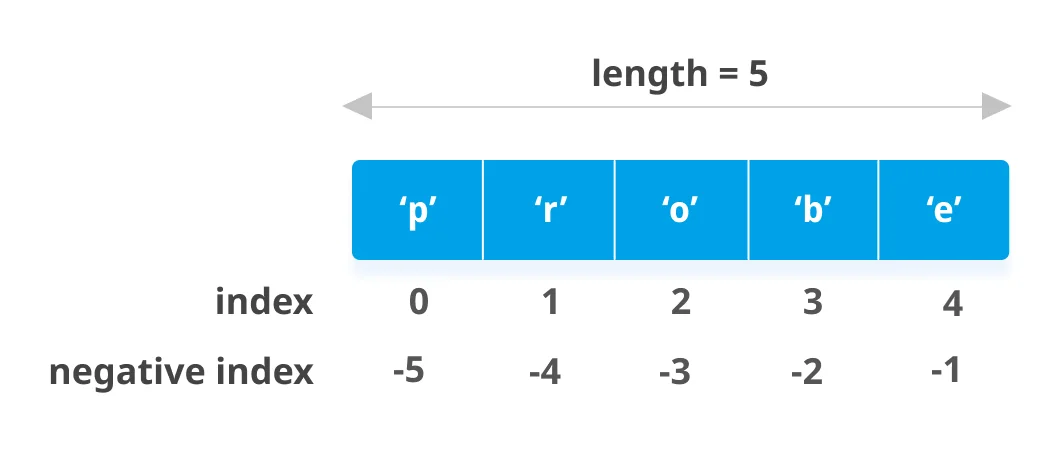
We can access a range of adjacent elements in a list using the slicing operator (:).
my_list = ['g', 'o', 'c', 'h', 'o', 'c', 'i', 't']

# elements from index 2 to index 4
print(my_list[2:5])

# elements from index 5 to end
print(my_list[5:])

# elements beginning to end
print(my_list[:])
Output
['c', 'h', 'o']
['c', 'i', 't']
['g', 'o', 'c', 'h', 'o', 'c', 'i', 't']
4. Changing, Adding, and Deleting Elements in a List
4.1. Changing Elements in a List
Use the assignment operator = to change elements in a list or insert elements into a list.
my_list = [2, 'it', 'hello', 8, 1]

# change the 1st item
my_list[0] = 'Gochocit'
print(my_list)

# change 2nd to 4th items
my_list[1:4] = [3, 5, 'good']
print(my_list)

# insert items into List
my_list[2:2] = ['John', 'Marry', 'Kane']
print(my_list)
Result
['Gochocit', 'it', 'hello', 8, 1]
['Gochocit', 3, 5, 'good', 1]
['Gochocit', 3, 'John', 'Marry', 'Kane', 5, 'good', 1]
4.2. Adding Elements to a List
Using the append() Function
Add an element, a list, or a tuple to the end of a list.
# Creating a blank List
List = []
print("Initial blank List: ")
print(List)

# Addition of Elements in the List
List.append(1)
List.append(2)
List.append(4)
print("List after Addition of Three elements: ")
print(List)

# Adding elements to the List using Iterator
for i in range(1, 4):
    List.append(i)
print("List after Addition of elements from 1-3: ")
print(List)

# Adding Tuples to the List
List.append((5, 6))
print("List after Addition of a Tuple: ")
print(List)

# Addition of List to a List
List2 = ['Gochocit', 'Hello']
List.append(List2)
print("List after Addition of a List: ")
print(List)
Result
List after Addition of Three elements:
[1, 2, 4]
List after Addition of elements from 1-3:
[1, 2, 4, 1, 2, 3]
List after Addition of a Tuple:
[1, 2, 4, 1, 2, 3, (5, 6)]
List after Addition of a List:
[1, 2, 4, 1, 2, 3, (5, 6), ['Gochocit', 'Hello']]
We can use the insert() Function
Insert elements at the specified index in a list.
# Creating a List
List = [1,2,3,4]
print("Initial List: ")
print(List)

# Addition of Element at specific index
List.insert(3, 12)
List.insert(0, 'Gochocit')
print("List after performing Insert Operation: ")
print(List)
Result
Initial List:
[1, 2, 3, 4]
List after performing Insert Operation:
['Gochocit', 1, 2, 3, 12, 4]
Using the extend() Function
Add multiple elements to the end of a list.
# Creating a List
List = [1, 2, 3, 4]
print("Initial List: ")
print(List)

# Addition of multiple elements to the List at the end
List.extend([8, 'Gochocit', 'Hello'])
print("List after performing Extend Operation: ")
print(List)
Result
Initial List:
[1, 2, 3, 4]
List after performing Extend Operation:
[1, 2, 3, 4, 8, 'Gochocit', 'Hello']
We can use the + and * operators
The + operator helps to concatenate two lists. The * operator helps to repeat a list with a specified number of times.
num_list = [1, 3, 5]
#Operator +
print(num_list + [9, 7, 5])
#Operator *
print(["it"] * 3)
Result
[1, 3, 5, 9, 7, 5]
['it', 'it', 'it']
4.3. Deleting Elements in a List
We can delete one or more elements in a list by using the del keyword. In addition, we can also delete the entire list with the del keyword.
my_list = [2, 'it', 'hello', 8, 1, 3, 5]

# delete one item
del my_list[2]
print(my_list)

# delete multiple items
del my_list[1:5]
print(my_list)

# delete the entire list
del my_list

# Error: List not defined
print(my_list)
Result
[2, 'it', 8, 1, 3, 5]
[2, 5]
Traceback (most recent call last):
  File "c:\python-examples\example.py", line 15, in <module>
    print(my_list)
NameError: name 'my_list' is not defined
Using the remove(), pop(), and clear() Functions
The remove() function helps to remove an element from a list. The pop() function helps to remove the last element in a list if no index argument is passed. The clear() function helps to remove the entire list.
my_list = [2, 'it', 'hello', 8, 1, 3, 5]

my_list.remove('it')
# Output: [2, 'hello', 8, 1, 3, 5]
print(my_list)

# Output: 'hello'
print(my_list.pop(1))

# Output: [2, 8, 1, 3, 5]
print(my_list)

# Output: '5'
print(my_list.pop())

# Output: [2, 8, 1, 3]
print(my_list)

my_list.clear()
# Output: []
print(my_list)
Result
[2, 'hello', 8, 1, 3, 5]
hello
[2, 8, 1, 3, 5]
5
[2, 8, 1, 3]
[]
We can also delete elements in a list by assigning an empty list to the list.
my_list = [2, 'it', 'hello', 8, 1, 3, 5]

my_list[2:3] = []
# Output: [2, 'it', 8, 1, 3, 5]
print(my_list)
my_list[2:5] = []
# Output: [2, 'it', 5]
print(my_list)
Result
[2, 'it', 8, 1, 3, 5]
[2, 'it', 5]